doi: 10.1016/j.acra.2020.04.028.
Epub 2020 May 1.
Virtual Read-Out: Radiology Education for the 21st Century During the COVID-19 Pandemic
Affiliations
- PMID: 32386950
- PMCID: PMC7252195
- DOI: 10.1016/j.acra.2020.04.028
Item in Clipboard
Virtual Read-Out: Radiology Education for the 21st Century During the COVID-19 Pandemic
Acad Radiol.
2020 Jun.
Abstract
Technologic advances have resulted in the expansion of web-based conferencing and education. While historically video-conferencing has been used for didactic educational sessions, we present its novel use in virtual radiology read-outs in the face of the COVID-19 pandemic. Knowledge of key aspects of set-up, implementation, and possible pitfalls of video-conferencing technology in the application of virtual read-outs can help to improve the educational experience of radiology trainees and promote potential future distance learning and collaboration.
Copyright © 2020 The Association of University Radiologists. Published by Elsevier Inc. All rights reserved.
Figures
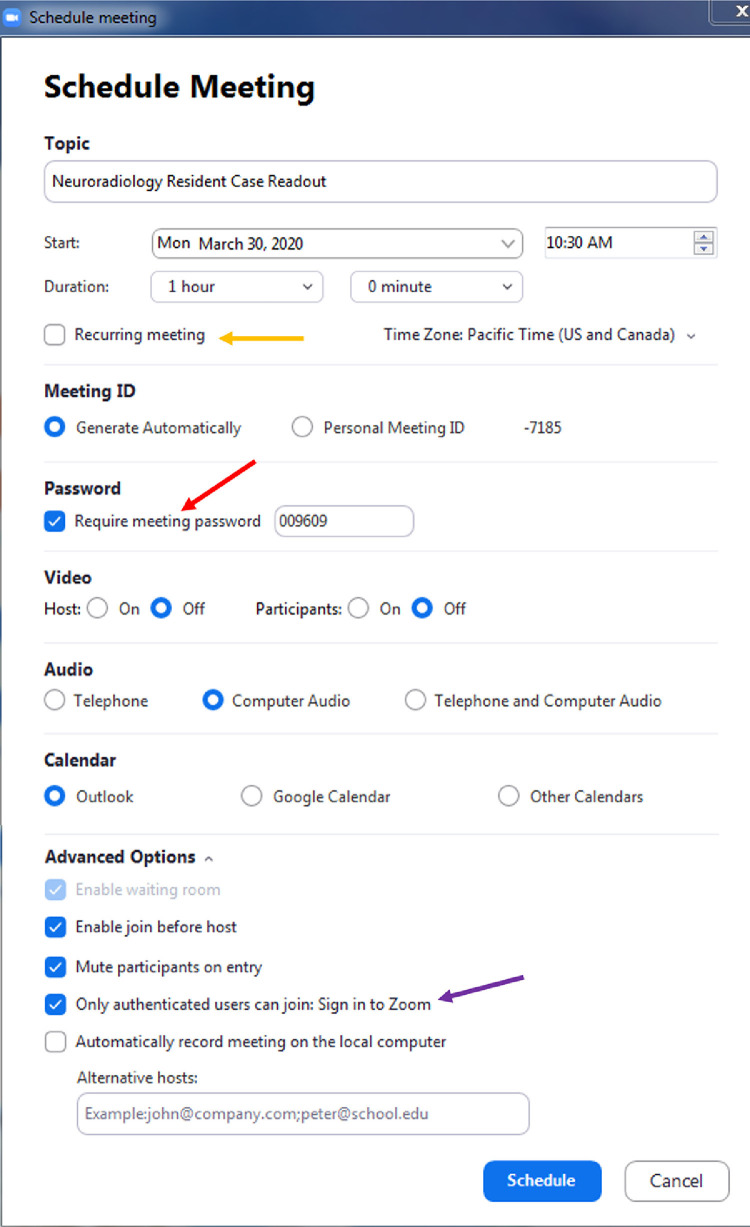
Video-conference scheduling options. In the video-conferencing platform, the host can customize and specify multiple settings for the virtual read-out session. Meetings can be set up impromptu or held at recurring intervals (orange arrow) to create fixed schedule. Extra security options like specifying a password (red arrow) to enter the read-out, as well as only allowing authenticated users to participate (purple arrow) can be chosen. A waiting room can also be utilized, where users logging in remotely wait to be admitted into the actual video-conference, in order to avoid “zoom-bombing” from uninvited guests. Other default options, such as turning off participant video and muting microphones can also be specified. (Color version of figure is available online.)
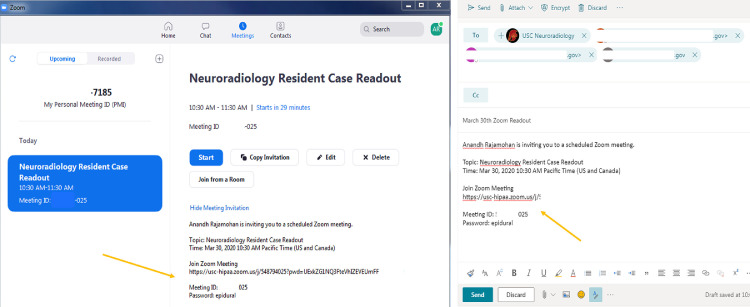
wInviting trainees and colleagues. Once a virtual read-out meeting has been scheduled and setup, the link to log in, meeting ID (anonymized), and password can be emailed or distributed to residents and other colleagues for participation (orange arrows). The invitation information may also be automatically imbedded into group calendars once a readout session is scheduled. (Color version of figure is available online.)
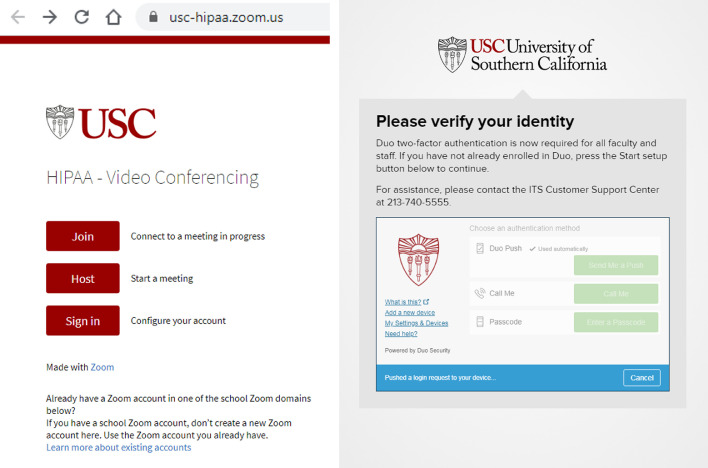
HIPAA compliance and security. At our institution, we utilize a HIPAA-compliant enterprise Zoom account to initiate a virtual read-out. This requires that the host creating the virtual readout use a two-factor identity authentication (TFA) to initiate and enter the video-conferencing platform. This safeguards patient protected health information and also serves as a measure to prevent unauthorized access to the video-conference. (Color version of figure is available online.)
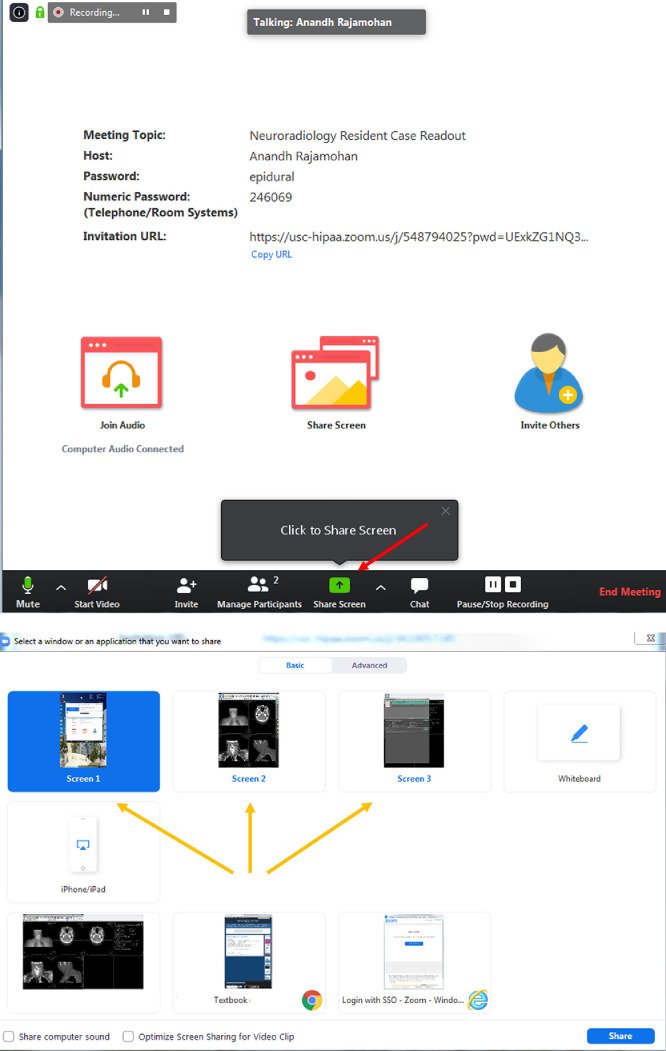
Screen-sharing options. (a) After the host radiologist launches the read-out session, she or he will have the option to share their PACS screen (red arrow) or any secondary screens to the remote viewers. (b) This screen-sharing function can be switched throughout the readout as needed (orange arrows). For example, the read-out session may involve a CT of the abdomen and pelvis for a patient with right lower quadrant abdominal pain with an incidental adrenal nodule. The host radiologist may want to switch the shared screen from the PACS to a webpage with an adrenal washout calculator, so all of the residents can see how the calculation is done. This screen-sharing function can also be given by the host to others who are involved in the readout remotely. For example, for the case discussing the adrenal nodule, a remote resident may bring up a good review article to show others in order to supplement knowledge on this topic. (Color version of figure is available online.)
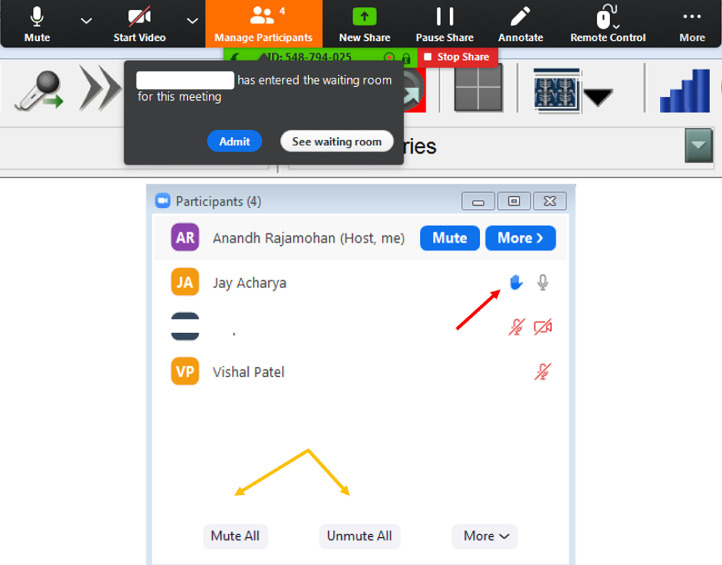
Host management of participants. (a) The hosting radiologist can choose an option to manually admit awaiting guests into the video-conference, which may serve as a protective measure against uninvited guests (Fig 2). (b) While a read-out is going on, the host can mute or unmute participants (orange arrows) in order to ask questions and add to a discussion. Trainees participating remotely can “raise their hand” to indicate if they have a question or something to add to the discussion (red arrow). (Color version of figure is available online.)
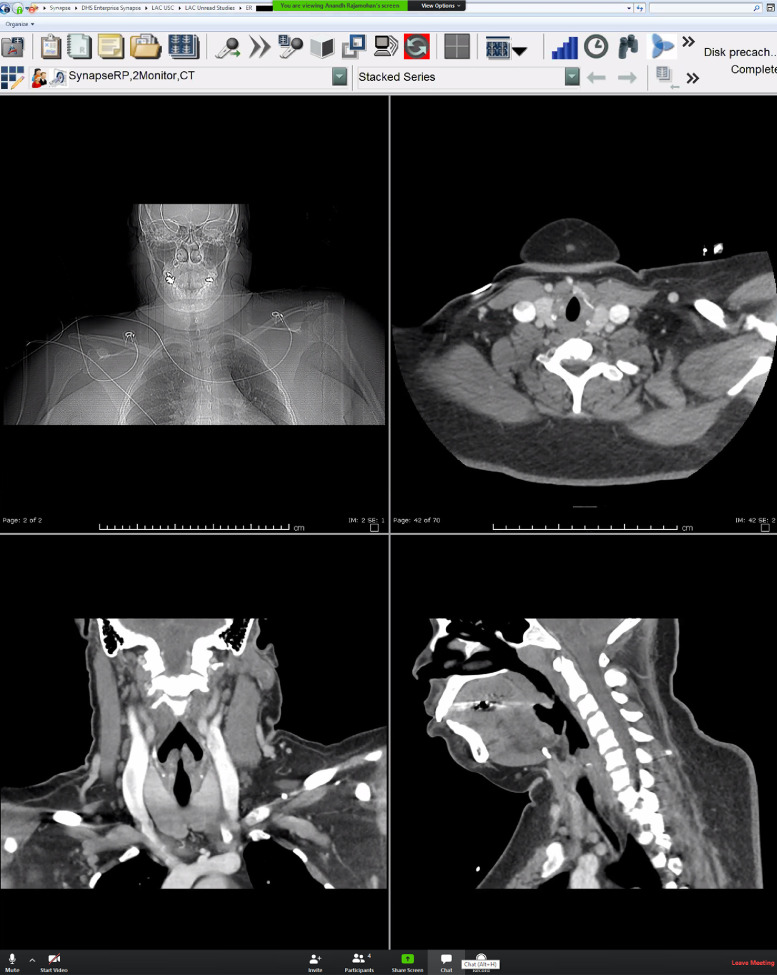
Shared screen. Example of the shared host screen, as viewed by a participant. (Color version of figure is available online.)
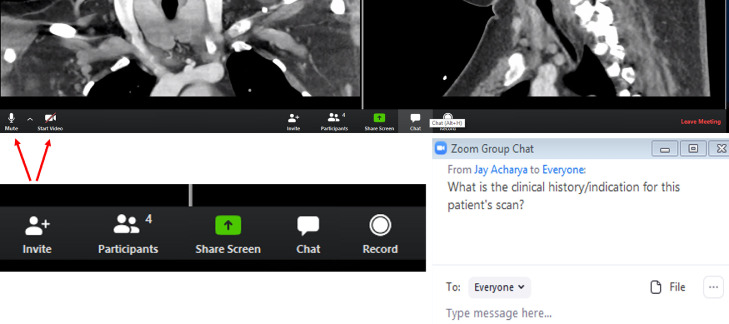
Participant control options. (a) The participant that is viewing the host screen has multiple options on the bottom of the screen. Features on the bottom left allow the participant to self-mute and start/stop video (red arrows). (b) The tab allows the participant to invite other guests (if permitted by the host), view participants, share her/his own screen, chat, or record the session. The “share screen” option can be particularly helpful if the participant has pulled up a journal article or has a specific question or would like to show something else on her/his own screen. (c) The group chat option allows an easy way for questions to be asked, whether to individuals or everyone in the group, particularly when there is a large number of participants in the group, so as to avoid too many people speaking simultaneously. (Color version of figure is available online.)
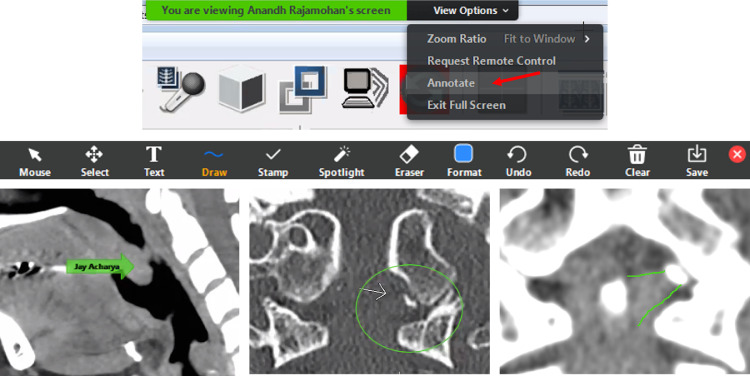
Additional participant control options. (a) The participant is able to choose the “annotate” feature (red arrow) at the top of her/his screen to annotate directly onto what the host screen projects. (b) The toolbar includes a variety of helpful options that are specifically relevant in a remote read-out session. (c) The arrow feature allows a participant to place an arrow on a desired region of interest, which is pointing to the palatine tonsillar tissue on this sagittal CT. This can be helpful during a virtual read-out “quiz” session. (d) Oval annotation allows the participant to circle an area of interest. Coronal CT of the craniocervical junction shows an avulsion fracture of the left occipital condyle (type III occipital condyle fracture). (e) The “free form” drawing feature is also a very helpful tool during the video-conference read-out. A Coronal CT of the craniocervical junction with a soft-tissue window shows an annotation outlining the left alar ligament in association with the type III occipital condyle fracture, as created using the “draw” tool. (Color version of figure is available online.)
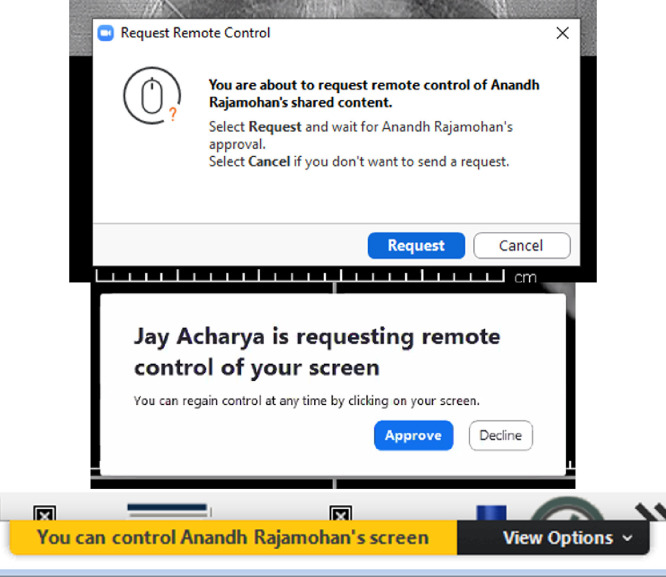
Remote control option. (a) A participant can request “remote control” of the host screen through the options bar (Fig 8a). (b) Before a participant can obtain remote control access, the host will be prompted to approve the request. This serves as another layer of defense against unwanted interruption of the video-conference. (c) Once requested and approved from both the participant and host, the participant screen will show “control” over the screen and is able to scroll through images as if she/he is physically on the host workstation. (Color version of figure is available online.)
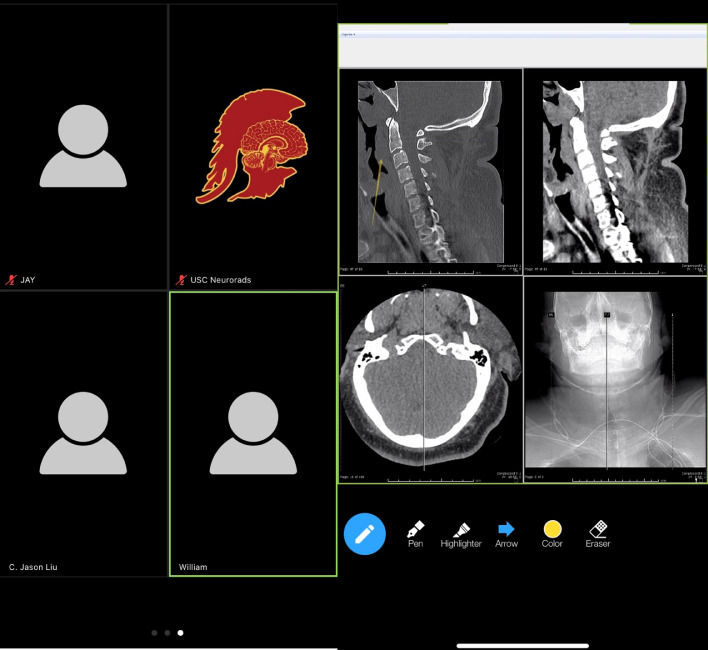
Mobile device access. Mobile devices can support the Zoom application, which permits participation on the go. The features are similar to those available on the computer-based version. (a) Screenshot shows the ability to see other participants on the mobile device, which can be scrolled across at the bottom of the device screen. (b) Mobile device screenshot of the “annotation” tool with placement of an arrow over the prevertebral soft-tissue swelling on the bone-window sagittal CT of the cervical spine. (Color version of figure is available online.)
References
-
- McCurdie B. The coronavirus has pushed courses online. Professors are trying hard to keep up. Chrono High Educ. 2020
-
- Green K.C. Campus Computing; Encino, CA: 2019. Campus computing 2019: the 30th National Survey of computing and informational technology in American Higher Education.
-
- Heffernan N.R., Strobel N.A., Prithiani C. Virtual radiology rounds: adding value in the digital era. Pediatr Radiol. 2016;46(12):1645–1650. - PubMed
-
- Zember J., Saul D., Delgado J. Radiology rounds in the intensive care units through a telepresence model. J Am Coll Radiol. 2018;15(11):1655–1657. - PubMed
-
- Miyashita T., Iketani Y., Nagamine Y. FaceTime((R)) for teaching ultrasound-guided anesthetic procedures in remote place. J Clin Monit Comput. 2014;28(2):211–215. - PubMed