. 2021 Mar 1;13(3):evab028.
doi: 10.1093/gbe/evab028.

sangeranalyseR: Simple and Interactive Processing of Sanger Sequencing Data in R

Affiliations

sangeranalyseR: Simple and Interactive Processing of Sanger Sequencing Data in R

Kuan-Hao Chao et al. Genome Biol Evol. .

Abstract

sangeranalyseR is feature-rich, free, and open-source R package for processing Sanger sequencing data. It allows users to go from loading reads to saving aligned contigs in a few lines of R code by using sensible defaults for most actions. It also provides complete flexibility for determining how individual reads and contigs are processed, both at the command-line in R and via interactive Shiny applications. sangeranalyseR provides a wide range of options for all steps in Sanger processing pipelines including trimming reads, detecting secondary peaks, viewing chromatograms, detecting indels and stop codons, aligning contigs, estimating phylogenetic trees, and more. Input data can be in either ABIF or FASTA format. sangeranalyseR comes with extensive online documentation and outputs aligned and unaligned reads and contigs in FASTA format, along with detailed interactive HTML reports. sangeranalyseR supports the use of colorblind-friendly palettes for viewing alignments and chromatograms. It is released under an MIT licence and available for all platforms on Bioconductor (https://bioconductor.org/packages/sangeranalyseR, last accessed February 22, 2021) and on Github (https://github.com/roblanf/sangeranalyseR, last accessed February 22, 2021).

Keywords: DNA; alignment; bioconductor; chromatogram; genetics; shiny application.


Figures

<sc>Fig</sc>. 1.
Fig. 1.
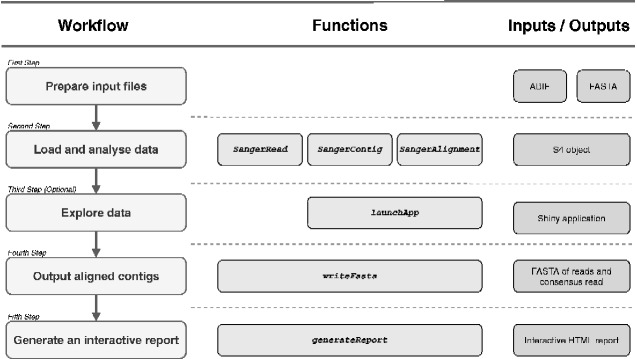
The five step sangeranalyseR analysis workflow. (Column 1) The steps of a simple analysis using sangeranalyseR. The third step, exploring data through Shiny applications, is optional. (Column 2) The corresponding functions invoked in each step of the analysis in column 1. After preparing input files, users can run SangerRead, SangerContig, or SangerAlignment to start an analysis. The different functions produce objects containing a single read, a single contig, or a collection of aligned (and so assumed alignable contigs). Shiny applications are only available for the SangerContig and SangerAlignment objects. (Column 3) The input and/or output files that correspond to each step of the analysis.
<sc>Fig</sc>. 2.
Fig. 2.
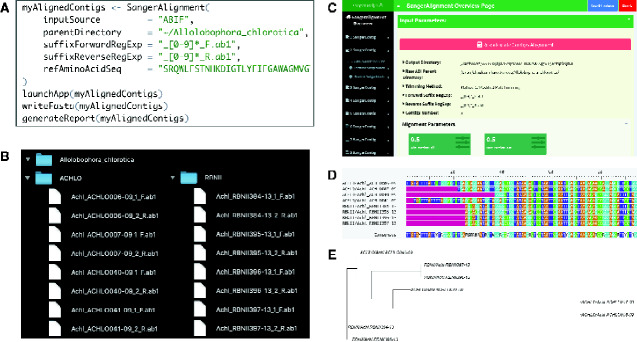
An example of creating a SangerAlignment to quickly and automatically create and align a set of homologous (and so alignable) contigs. (A) Shows the four lines of R code required for this analysis. (B) Shows that the input files can be split among many folders, and demonstrates the naming convention for input files. Allolobophora chlorotica is the root directory containing ACHLO and RBNII subdirectories. Sixteen ABIF files are distributed in these two subdirectories, and each of them is named with a contig name plus a direction suffix. (C) Shows a screenshot of the Shiny application that pops up when running the second line of R code in (A). The application allows users to access all reads and contigs through the navigation bar on the left. (D) and (E) are respectively the alignment and phylogenetic trees for the eight contigs created in this analysis.
<sc>Fig</sc>. 3.
Fig. 3.
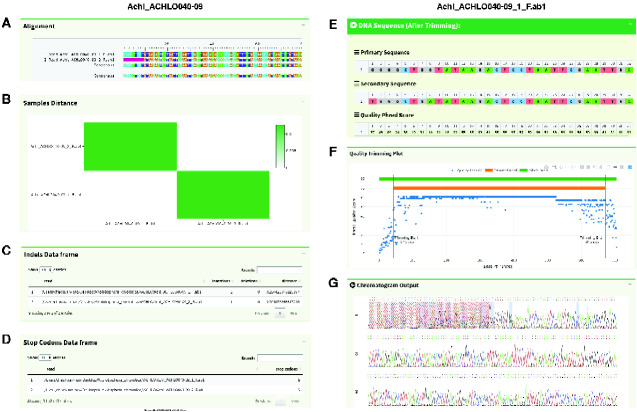
The Shiny application allows users to quickly interrogate contigs (left hand column) and individual reads (right hand column). For the analysis of a single contig (A) shows the alignment of reads and the consensus read; (B) is the heatmap showing the distance between the reads in the contig; and (C) and (D) are the data frames of indels and stop codons in the individual reads. For the analysis of a single read, (E) shows the trimmed primary sequence, secondary sequence, and the quality score for each nucleotide; (F) shows the interactive quality trimming plot with the trimming positions at 3′ and 5′ ends labeled with a red line, and the green bar and orange bar representing the extent of the untrimmed and trimmed read, respectively; (G) shows the chromatogram of the read with the trimmed portion hatched in red. The colors of A/T/C/G signal lines match the colors of nucleotides in (E). Colors in the Shiny application can be adjusted in the package to suit colorblind users.

References

    1. Allaire J, Xie Y, McPherson J, Luraschi J, Ushey K, Atkins A, Wickham H, Cheng J, Chang W, Iannone R (2021). rmarkdown: Dynamic Documents for R. R package version 2.7, https://github.com/rstudio/rmarkdown
    1. Attali D. 2020. shinyjs: easily improve the user experience of your shiny apps in seconds. R package version 2.0.0. Available from: https://cran.r-project.org/web/packages/shinyjs/index.html
    1. Bolger AM, Lohse M, Usadel B.. 2014. Trimmomatic: a flexible trimmer for Illumina sequence data. Bioinformatics 30(15):2114–2120. - PMC - PubMed
    1. Cock PJ, et al.2009. Biopython: freely available Python tools for computational molecular biology and bioinformatics. Bioinformatics 25(11):1422–1423. - PMC - PubMed
    1. Ewing B, Green P.. 1998. Base-calling of automated sequencer traces using phred. II. Error probabilities. Genome Res. 8(3):186–194. - PubMed

LinkOut - more resources